Automated email
Sends itself from your own connected Gmail, inside the sending hours you set and spread out so a big list doesn’t all go at once. Anyone who has unsubscribed is skipped.

Most jobs are lost to silence, not to “no.” Build a follow-up plan once, enroll a lead or an unsold quote in one click, and HomerAI works it: emails send themselves, and every call and text lands on the right rep’s list on the right day.
Included on Growth plans and above.
BUILD
A text now, a call tomorrow, an email in three days. Or let Homer draft the sequence for you from your website.
ENROLL
Enroll one contact or company in a click, select a batch from your contacts, or put every unsold estimate into a quote follow-up.
RUN
Automated emails go out on their own. Calls, texts and other steps become tasks for the rep who owns the contact, due the day the step comes up.
STOP
When a call shows the person isn’t interested, they’re taken out of every sequence automatically. Anyone can be unenrolled in one click.
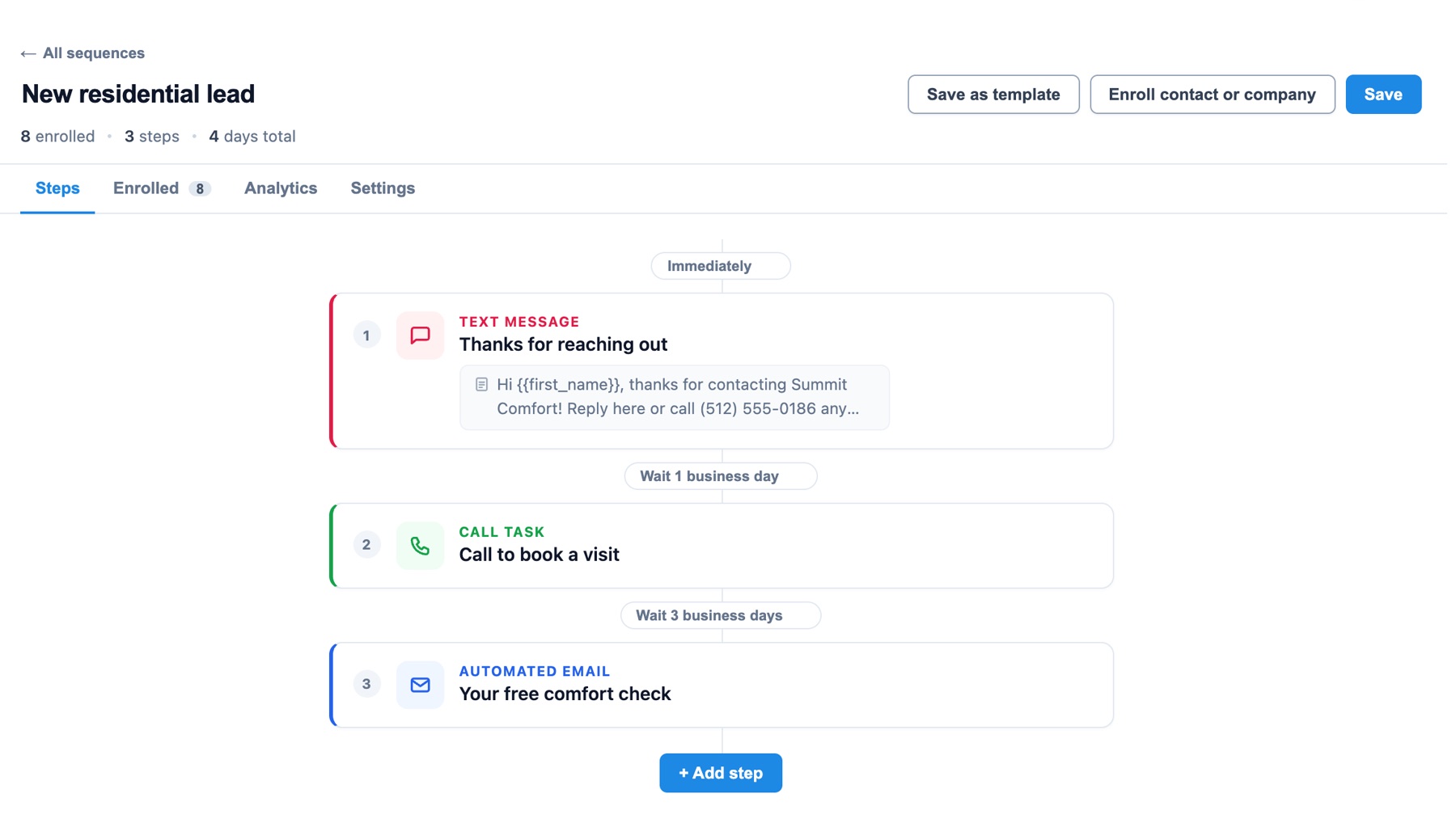
Three steps, four business days, eight leads enrolled.
Sends itself from your own connected Gmail, inside the sending hours you set and spread out so a big list doesn’t all go at once. Anyone who has unsubscribed is skipped.
A call lands on the rep’s task list with the script you wrote for that step. Work them one by one, or through the parallel dialer.
The text is written and personalized ahead of time, and lands on the rep’s list as a task, ready to send.
For the messages worth writing by hand, a reminder to send a personal email, with your draft attached.
Anything else that should happen on a schedule: drop off a brochure, check the permit, send a thank-you card.
For commercial accounts, a reminder to connect with the decision-maker at the right point in the sequence.
Point Homer at your website and it writes up to three ready-to-use sequences in your tone, about the services you actually offer. Edit anything, then enroll.
Homer skips any that don’t fit your business. Every step can use merge fields such as the customer’s first name and company, and your email signature.
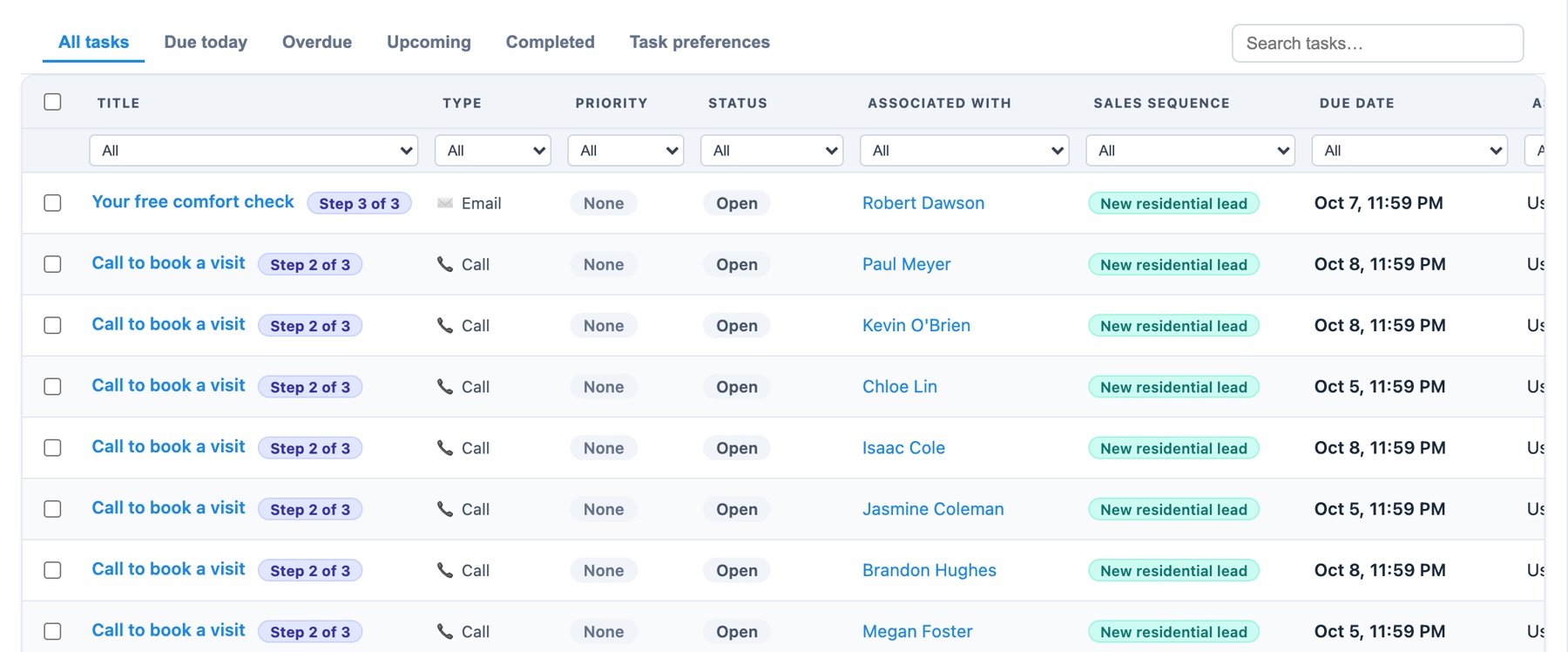
Every call, text and email a sequence creates lands on one task list, tagged with the sequence and the step it came from, and assigned to the rep who owns the contact.
“Wait 2 days” means two working days where your business is, so nothing lands on a Sunday.
Someone who unsubscribes or is marked do-not-email never gets another sequence email.
When a recorded call’s AI summary shows the person isn’t interested, they’re removed from every sequence and their remaining tasks are cleared.
Every automated email shows up in Sent and on the contact’s history, marked as sent by the sequence.
Each step goes to the rep who handled the last one, or the contact’s owner, so a task never lands on nobody.
When a storm, heat wave or freeze is coming, the Weather Agent drafts a sequence for it, paused until you turn it on.
Automated email steps send on their own. Every other step, including calls and texts, becomes a task for the rep on the day it’s due, with the script or message already written.
Your own. Connect your Gmail account to HomerAI, and sequence emails go out from it, so replies come straight back to your inbox.
They finish the last step, or you unenroll them in one click, which clears their remaining tasks. If a recorded call shows they’re not interested, Homer removes them from every sequence automatically.
Yes. Filter your contacts, select them, and enroll the whole batch. Automated emails are spread across your sending hours rather than all leaving at the same minute.
Sales sequences are included on Growth plans and above. See pricing for the full comparison.
We’ll set up a quote follow-up sequence in the demo and show you what your team would be working tomorrow.