AI receptionist
Picks up nights, weekends, holidays, and whenever your CSR is already on another call. Runs on a Twilio phone number.

HomerAI's AI receptionist answers your business line 24/7. The same agent runs an AI chatbot and an AI voicebot on your website. Whether a customer calls, types or talks, they get an answer and a real appointment, and the lead goes straight into your CRM.
Or try it here: the chat bubble and the Call button on this page are the real thing.
Picks up nights, weekends, holidays, and whenever your CSR is already on another call. Runs on a Twilio phone number.
Answers the 9pm visitor's questions in a chat window, takes their details, and books the visit before they leave your site.
Visitors press Call and just talk, hands-free, from the browser. No phone number, no app, no waiting on hold.
Most home service calls that go to voicemail never call back. They call the next company on the list. Homer picks up on the first ring and handles the call the way your best CSR would.
Call 1-737-241-5934 to talk to it yourself.
A contact form tells a visitor someone will get back to them tomorrow. Homer's chatbot answers them now, from what you've told it about your business, and books the visit while they're still on your site.
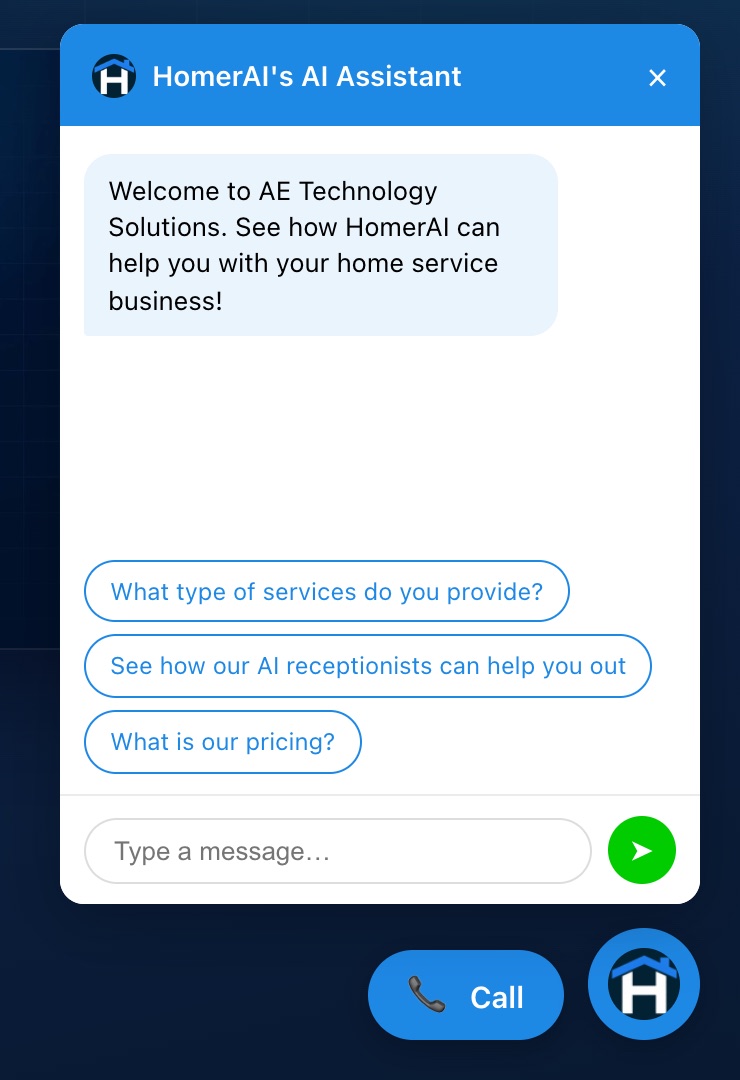
The live chatbot on our own website, with the voicebot's Call button beside it. Your colour, greeting and suggested questions.
The voicebot puts a Call button on your website. The visitor presses it and talks to Homer in the browser. Homer reads your sitemap, so it knows every page on your site. When a visitor asks about something, it can take them to the right page without ending the call.
sitemap.xml, or the links on your homepage if you don’t have one, and indexes every page by its title and description. New pages are picked up automatically within 12 hours.This is how it works on our own site. Press Call on this page and ask to see pricing.
The receptionist, the website chatbot and the website voicebot each start from a template in HomerAI. Pick one, check the instructions Homer drafted from your website, and switch it on.
STEP 1
Booking Agent for your phone line, Chatbot for Website, or Voicebot for Website. Run one, two or all three.
STEP 2
Your services, service area and booking rules, drafted from your website. Edit anything before it goes live.
STEP 3
Buy a Twilio number for the receptionist, and paste one line of code into your website for the chatbot and voicebot.
You aren't buying three tools from three vendors and hoping they agree. Every channel books against one schedule and writes to one customer record.
Every channel checks live availability before it offers a time, so nobody gets promised a window you can't hit.
Every address is verified as real and checked against your service area before anything is booked, so jobs only land where your techs actually go.
Calls, chats and website calls all create or update the same contact records your office and sales team work from.
Services, pricing rules, service area, and what to say about warranties. Homer drafts them from your website, and you edit them.
With the Weather Agent on, every channel has your local forecast, so “can you get here before the freeze?” gets a real answer and weather emergencies are treated as urgent.
Website visitors can only create and book for themselves. The chat and voicebot can't look up other customers, and they only run on the domains you approve.
| The customer | Without it | With HomerAI |
|---|---|---|
| Calls at 4am with a burst pipe | Voicemail, then they call the next company | Answered, walked to the shut-off, booked for 7am, on-call escalated |
| Calls while your CSR is on another line | Rings out, or sits on hold | Your line forwards unanswered calls to Homer’s number |
| Browses your site at 9pm | Fills in a form and waits until tomorrow, if they bother | Gets an answer in the chat and books before leaving |
| Would rather talk than type | Has to find your number and call | Presses Call on the website and talks |
| Becomes a lead | Someone copies a voicemail or email into the CRM | Already a contact, with a verified address and an appointment |
Its own. The AI receptionist runs on Twilio, so you'll need a Twilio phone number for it. You can buy one from inside HomerAI, or connect a Twilio account you already have. Publish that number, or keep the one on your trucks and have your phone provider forward calls to it: all of them, after hours, or only the ones nobody picks up. Twilio's charges for the number, call minutes and text messages are paid by you, at Twilio's rates. Your HomerAI plan covers the AI receptionist itself, in AI voice minutes; see pricing.
Yes. Each one is a single line of code you paste into your site, and it works on WordPress, Wix, Squarespace or anything custom. You choose which domains it's allowed to run on. If your site is built with the HomerAI website builder, the chatbot is a block you add to the page.
It books. On the phone, in the chat and on the website voicebot, Homer checks real availability and puts the appointment on your schedule. You decide what it's allowed to do on its own, and can start with booking after hours only.
No. The browser only asks for the microphone when a visitor presses Call, and releases it the moment the call ends. Calls left idle hang up on their own.
It reads your sitemap.xml, which most website builders, including WordPress, Wix and Squarespace, publish automatically. If there isn't one, it follows the links on your homepage. It records each page's title and description, and checks again every 12 hours, so a page you add today is one it can take visitors to tomorrow.
Homer identifies itself as an assistant if asked, and we recommend it always does. You control the greeting, the name, and the disclosure. In practice, customers care far more about getting a real answer and a real appointment than about who took the details.
Ring the live line or use the chat and Call buttons on this page. Then we'll set it up with your services and your schedule.